Make your ElevenLabs voice agents make and receive calls
Give your ElevenLabs ConvAI agent a real phone number, route inbound calls to it from anywhere in the world, and let it dial out through 2Chat SIP trunking at carrier-friendly rates.

90+
countries
Connect 2Chat to ElevenLabs in three steps
2Chat handles the carrier side. ElevenLabs handles the agent. Together you get a production-grade voice AI you can ship today.
Step 1
Get a phone number on 2Chat
Buy a virtual number in any of 90+ countries from 2Chat or bring your own. Configure call flows, IVRs, and fallbacks visually.
Step 2
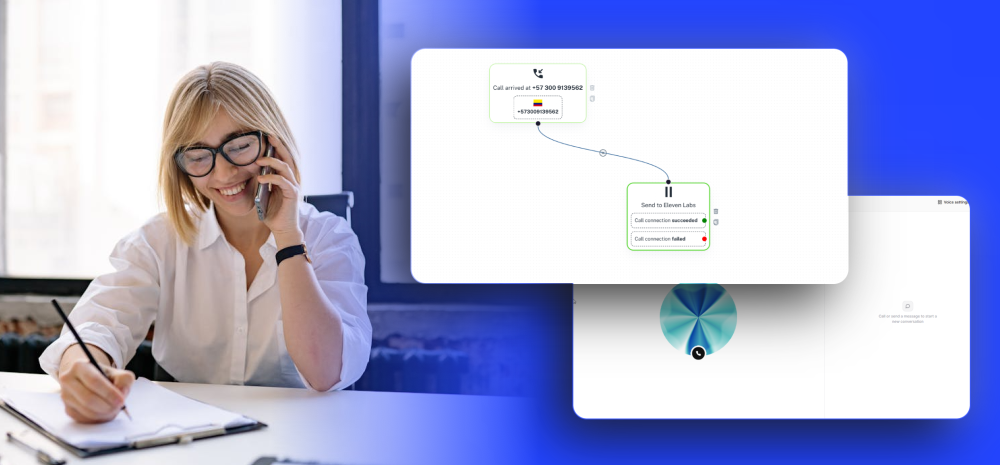
Send inbound calls to your agent
Drop a "Send to ElevenLabs" block in your call flow, point it to your agent's SIP URI, and any caller hits the agent in real time.
Step 3
Let the agent place calls back
Use 2Chat as the SIP trunk for ElevenLabs outbound. Your agent dials any number using your caller ID and is billed at 2Chat rates.
Watch how to connect ElevenLabs to a real phone number
Follow this step-by-step tutorial to put your ElevenLabs voice agent on a real phone line with 2Chat, from buying the number to taking the first call.
A production-ready phone layer for ElevenLabs
Everything you need to put a voice agent on the phone, without piecing together a carrier, an IVR, and a billing plan from three different vendors.
Inbound calling, your number
Route any inbound call landing on a 2Chat number straight to your ElevenLabs agent over SIP, with E.164 formatting handled for you.
Outbound SIP trunking
Use us.voip.2chat.io as the SIP server for ElevenLabs outbound calling. TCP transport, X-SIP-Trunk header, credentials managed in 2Chat.
Numbers in 90+ countries
Pick a local number wherever your customers are. Switch between numbers and assign each one to a different agent or flow.
Lower per-minute rates
Skip the markup of bundled telco resellers. 2Chat passes carrier rates through, so calling minutes for your agent stay predictable.
IVRs, fallbacks, and human handoff
Send only the right calls to your agent. Press-1 menus, business-hours logic, and forwarding to a human are one block away in the 2Chat call designer.
Recordings and transcripts
Every call routed through 2Chat is logged with metadata, recording, and ElevenLabs transcript so you can review and audit conversations.
Phone numbers and minutes priced like a carrier
ElevenLabs charges for the agent. 2Chat charges for the phone number and the minutes. The combo is simpler and cheaper than building this on top of generic SIP providers.
Inbound: bring a 2Chat number
Buy a virtual number in 90+ countries on a monthly plan and route every inbound call to your ElevenLabs agent.
Outbound: 2Chat as your SIP trunk
Plug 2Chat in as the SIP trunk for ElevenLabs outbound and pay per minute, country by country.
Need volume pricing or a custom region? Get in touch and we will route your traffic at scale.
Start free trialAlready on Twilio? Keep your numbers, skip the porting
If you already own numbers on Twilio, you do not need to port them out to use them with ElevenLabs. Connect Twilio to 2Chat in a couple of clicks and your numbers show up ready to be wired into your call flows.
Twilio BYOC
Sync Twilio numbers, no porting required
2Chat connects to your Twilio account using your Account SID and Auth Token, then exposes your existing numbers inside 2Chat so you can route inbound calls to your ElevenLabs agent and use the same numbers as caller IDs for outbound calls.
How the import works
Grab your Account SID and Auth Token from the Twilio Console.
In 2Chat, open Virtual Numbers and choose the sync option.
Paste your credentials. 2Chat validates them and lists every number on the account.
Pick the numbers you want and click Sync Selected Numbers. They show up in your list with caller IDs ready to use.
Related articles
Check out some of our blog posts that you might find useful
Learn how to build an AI voice agent to schedule appointments 24/7. Automate your bookings and never miss a client using 2Chat, ElevenLabs, and Cal.com.

Get a local number in over 90 countries and connect it to ElevenLabs in a few minutes.
Put your ElevenLabs agent on the phone today
Sign up for 2Chat, grab a number, and connect it to your agent in minutes. Documentation and integration credentials are waiting for you in the dashboard.